guides
Best Golf Swing Video Recording Setup: $30 to $600
I filmed my swing for the first time on a $600 launch monitor, and the video was not any better than the one my phone already takes. You do not need expensive gear to see your swing. You need to see it clearly, from the same angle every time, and that problem was solved the day phone cameras got good.
Confusion sells $600 monitors and $300 tripods you do not need, and the golf industry is happy to keep it that way. The part no one teaches is how to actually film it: what to buy, where to point the camera, whether a $500 system beats a free app. Instructors tell you to film your swing and leave the rest to you. A 2010 GolfWRX forum thread still ranks near the top of Google for this topic, which tells you how little real editorial guidance exists.
The recording kit worth buying runs from a $30 tripod up to a $600 launch monitor, and each piece earns its price. The short version: your phone is the camera. Everything else is just holding it still and reading the footage.
1. BMZX Golf Tripod Monopod $30: The Only Gear You Actually Need
Best for: Any golfer who has been told to film their swing and owns a phone.
The BMZX Golf Tripod Monopod is a 47-inch selfie stick that turns into a tripod. It has a ground spike you jam into turf, fold-out tripod legs for mats and concrete, a magnetic phone holder, and a 1/4”-20 screw for a camera or action cam. That screw matters because the same $30 stick mounts a GoPro or a webcam if you ever upgrade.
The magnetic holder is the phone mount you would otherwise buy separately for $10 to $20. It is included. Do not buy a second clamp.
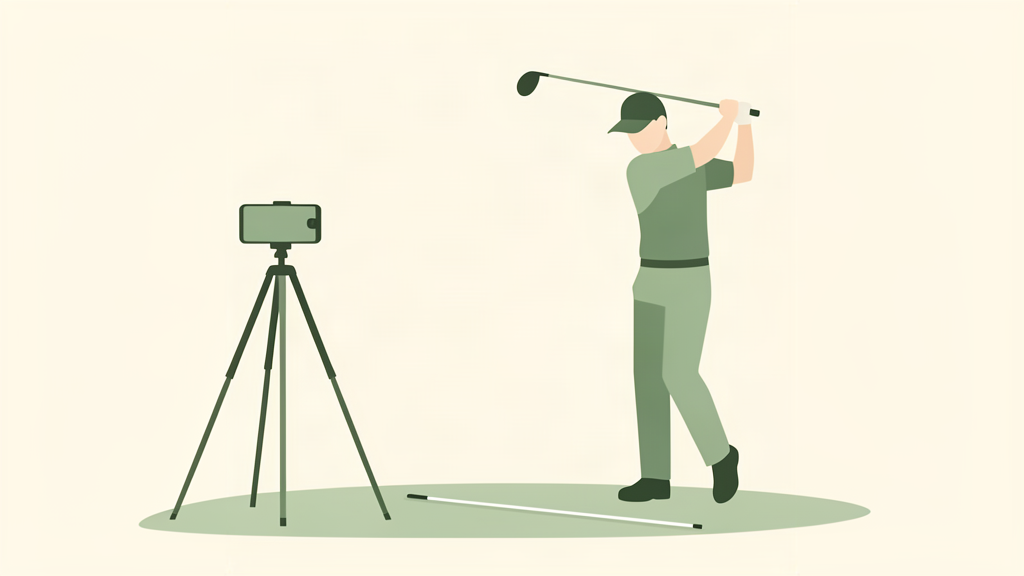
Set it face-on or down-the-line, hit record, and go. Extended to 47 inches, the camera sits around hip height on flat ground, which is roughly right for full-swing video. You want the lens at hand height, pointed at your hands, about eight feet away. The adjustable legs get you there on uneven ground.
What does not work. The magnetic mount holds a phone fine but will not hold a heavy iPad. The plastic legs flex a little on a windy range. If you film on a mat, use the legs, not the spike.
Verdict: Buy it. This is the only piece of recording gear most golfers actually need. Your phone is already a better camera than the broadcast cameras used at tour events twenty years ago.
2. SuperStroke Alignment Sticks $15: Your $15 Camera Operator
Best for: Anyone who films down-the-line and wonders why the angle is always crooked.
Alignment sticks are the cheapest training aid in golf, and they double as camera gear. Lay one stick on the ground pointing at your target for a down-the-line shot, or perpendicular to your target line for face-on. Line the phone up with the stick and you get the same camera angle every session, which is the entire point. Without a fixed reference, every video is shot from a slightly different angle and you cannot compare your swing from one week to the next. If you want more ways to use them, we wrote a full set of alignment stick drills.
The SuperStroke sticks come as a two-pack for about $15 to $25 and include a carry tube. Callaway sells a nearly identical set if you prefer the logo. Both do the same job.
What does not work. Nothing wrong with the sticks. The mistake is yours: skip the stick on the ground and you get random angles and useless footage.
Verdict: Buy it. You probably already own a set. Start using it as a camera reference, not just a swing-path line.
3. Rapsodo MLM2PRO $599.99: The Serious Upgrade
Best for: The golfer who wants launch data and swing video in the same session.
The Rapsodo MLM2PRO is a dual-camera launch monitor that records your swing while it measures ball data: carry distance, ball speed, launch angle, and spin. Pair it with your phone, set it behind you, and it captures a slow-motion swing replay plus the numbers on every shot. If you are deciding between it and the original MLM, we broke down the MLM vs MLM2PRO upgrade in detail.
This is where the money buys something your phone cannot do: radar-measured carry distance and spin. Your phone records video. The MLM2PRO tells you the 7-iron went 158 yards with 6,800 rpm of spin. That loop, video plus data, is what turns filming from a chore into a practice system.
The catch is the balls. For spin numbers, the MLM2PRO wants RPT balls, Rapsodo’s marked version of a Callaway Chrome Tour, about $70 a dozen. You still get carry and ball speed with regular balls, but spin needs the marked ones.
What does not work. It is $599.99, twenty times the tripod setup. It is overkill if your goal is just to look at your swing once a week. It also adds a second device to charge and a second app to manage.
Verdict: Worth it if you already practice with a launch monitor or want the video-and-data loop. Skip it if you just want to watch your swing.
4. The Apps: V1 Golf vs OnForm (Free to $69.99/yr)
Best for: Turning raw phone video into actual swing analysis.
Once you have the footage, an app makes it useful. Two dominate the category, and they are not the same tool.
V1 Golf is the old standard. It draws lines and angles over your swing, compares you side-by-side to a model swing, and includes drills from teaching pros. It runs $69.99 a year or $9.99 a month, with a free 7-day trial. Many teaching pros still use it, so if you take online lessons, your coach probably sends you V1 videos.
OnForm is what Hudl Technique became after OnForm bought it in 2021. It does side-by-side comparison, frame scrubbing, and markup, and it is built around sharing video with a coach. It runs $9.99 to $14.99 a month. If you remember Hudl Technique, this is that app, still alive under a new name. For more on the analyzer category, read our AI swing analyzer apps guide.
What does not work. Both apps are only as good as the video you feed them. A shaky handheld clip gives you nothing to draw lines on, which is why the $30 tripod comes first. V1 Golf users complain the subscription is hard to cancel. OnForm is aimed at coach communication, so half its value is wasted if you do not have a coach.
Verdict: Get V1 Golf if you want the classic analyzer with model comparisons. Get OnForm if you work with a coach. If you just want to watch your swing in slow motion, your phone’s built-in editor already does that for free.
What I Would Actually Buy
If you only buy one thing, get the BMZX tripod for $30. That plus the phone in your pocket is a complete swing recording setup. Add a pair of alignment sticks for $15 if you want consistent camera angles.
If you are serious enough to want data with your video, the MLM2PRO at $599.99 is the honest upgrade, and it is where the spending should stop unless you are building a home simulator.
The whole starter kit, tripod plus sticks, runs about $45. That is less than a box of Pro V1s, and it will outlast every ball in it.
Where to Get This Gear
- BMZX Golf Tripod Monopod ~$30 at Amazon
- SuperStroke Alignment Sticks $15-$25 at Amazon
- Rapsodo MLM2PRO $599.99 at Amazon
- V1 Golf $69.99/yr or $9.99/mo (app store)
- OnForm $9.99-$14.99/mo (app store)
As an Amazon Associate we earn from qualifying purchases on the Amazon links above. V1 Golf and OnForm are software subscriptions and are not affiliate links.